Nest(NestJS)是一个用于构建高效、可扩展的 Node.js 服务器端应用程序的框架,中文官网
项目创建
// 构建全局脚手架  创建项目
npm i -g @nestjs/cli
nest new project-name
创建项目的过程中会直接拉取脚手架依赖,我经常需要额外依赖
// 为项目设置配置项依赖
npm i @nestjs/config
yarn add dotenv -S  // 读取 .env 配置插件

// 使用方式
import {ConfigModule} from '@nestjs/config';
import * as dotenv from 'dotenv';

@Module({
  imports: [
    ConfigModule.forRoot({
      envFilePath: '.env',// 可以动态设置环境变量文件
      isGlobal: true, // 是否全局注入
      load: [() => dotenv.config({ path: '.env'})],// 设置加载更多文件,例如开发和生产共享配置
    }),
  ],
  controllers: [AppController],
  providers: [AppService],
})
export class AppModule {}
配置还支持校验,使用 joi 插件可以设置配置的默认值、范围、类型
项目配置
import {NestFactory} from '@nestjs/core';
import {AppModule} from './app.module';
import {Logger} from '@nestjs/common';

async function bootstrap() {
  // 设置打印名称
  const logger = new Logger('bootstrap');
  const app = await NestFactory.create(AppModule,{
    cors: true,// 设置跨域方式一
    logger: fasle,// 关闭日志
    logger: ['error', 'warn', 'debug', 'verbose'],// 只打印指定的类型日志
  });
  app.enableCors();// 设置跨域方式二
  app.setGlobalPrefix('api/v1');// 设置路由前缀
  await app.listen(process.env.PORT ?? 3000);
  logger.log(`Application is running on: ${await app.getUrl()}`);
// [Nest] 14368  - 2025/06/30 21:35:27     LOG [bootstrap] Application is running on: http://[::1]:3000
}
bootstrap();
常用的日志插件:
- nestjs-pion:高度自动化日志插件,支持在 controller 组件层拦截自动设置打印日志,不需要在代码层额外设置。poin-pretty 支持在控制台设置 json 格式日志,poin-roll 支持将日志输出到文件并控制大小
- nest-winston:高度集成的日志插件,可以查看 gitee 上我的 express 项目设置
SWC
SWC(Speedy Web Compiler)是一个基于 Rust 的可扩展平台,可用于编译和打包。将 SWC 与 Nest CLI 结合使用是显著加速开发流程的绝佳且简单的方式。
// 安装插件
 yarn add  @swc/cli @swc/core --save-dev

// nest-cli.json 文件
{
  "$schema": "https://json.schemastore.org/nest-cli",
  "collection": "@nestjs/schematics",
  "sourceRoot": "src",
  "compilerOptions": {
    "builder": "swc",
    "deleteOutDir": true
  }
}
数据库
nestjs 支持集成任何 SQL 或 NoSQL 数据库,支持 TypeORM、 Prisma、Sequelize、Knex.js
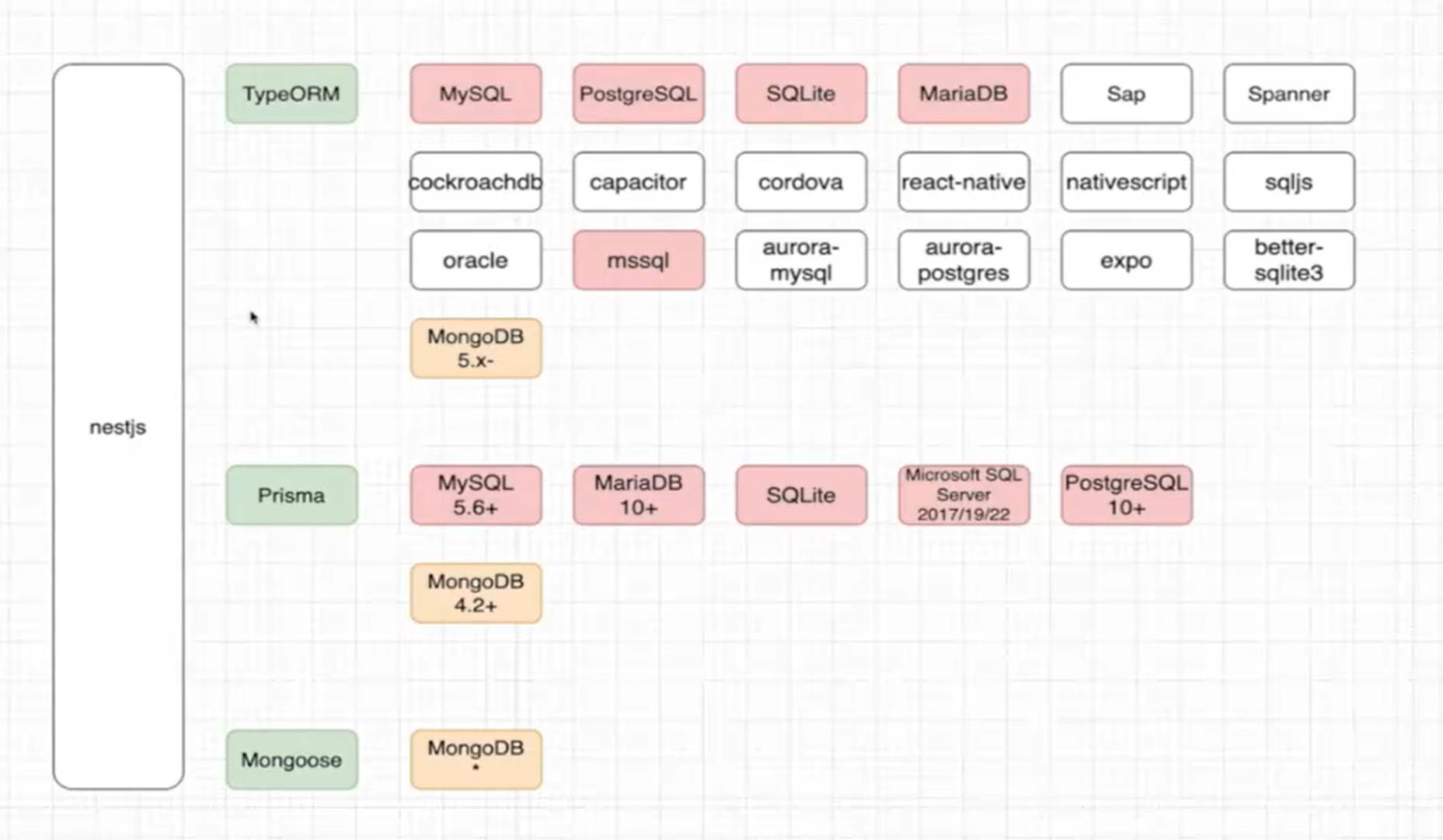
TypeORM
- 与 NestJS 集成最佳,官方推荐
- ypeScript 原生支持,类型安全完善
- 装饰器语法,与 NestJS 风格一致
- 丰富的功能:关系映射、迁移、事务、查询构建器等
- 缺点:复杂查询性能可能不如原生 SQL
Prisma
- 使用方式和 Python 的 FastApi 使用的 sqlalchemy 类似
- 类型安全极佳,自动生成类型定义
- 直观的数据模型定义
- 性能优秀,查询优化好
- 迁移管理简单
- 缺点:相对较新,生态系统不如 TypeORM 成熟
Sequelize
- 非常成熟,经过大量生产验证
- 功能全面,支持各种数据库
- 事务处理强大
- 缺点:配置相对复杂,代码风格与 NestJS 不够一致
Knex.js
- 轻量灵活
- 完整的 SQL 控制权
- 缺点:需要手动处理对象映射,没有内置的 ORM 功能
在官网上有两个地方描述使用数据库:Database、recipes 下的目录都有讲解
TypeORM
是一个 对象关系映射(Object Relational Mapping)工具,把数据库的操作映射成为对象的相关操作
// 依赖安装
npm install --save @nestjs/typeorm typeorm mysql2
// 数据库连接
import {Module} from '@nestjs/common';
import {TypeOrmModule} from '@nestjs/typeorm';

@Module({
  imports: [
    TypeOrmModule.forRoot({
      type: 'mysql',
      host: 'localhost',
      port: 3306,
      username: 'root',
      password: 'root',
      database: 'test',
      entities: [],
      synchronize: true,// 切勿在生产中使用 synchronize: true,会导致生产数据丢失
    }),
  ],
})
export class AppModule {}

// models/user.ts 数据库定义表结构
import {Entity, Column, PrimaryGeneratedColumn} from 'typeorm';

@Entity() // Entity 表明是一个实体类
export class User {@PrimaryGeneratedColumn()
  id: number;
  @Column()
  name: string;
  @Column({default: true})
  isActive: boolean;
}
// curd/user.services
import {Injectable} from '@nestjs/common';
import {InjectRepository} from '@nestjs/typeorm';
import {Repository} from 'typeorm';
import {User} from '../models/user';

@Injectable()
export class UsersService {
  constructor(@InjectRepository(User)
    private usersRepository: Repository<User>,
  ) {}

  findAll(): Promise<User[]> {return this.usersRepository.find();
  }

  findOne(id: number): Promise<User | null> {return this.usersRepository.findOneBy({ id});
  }

  async remove(id: number): Promise<void> {await this.usersRepository.delete(id);
  }
}

// controllers/user.controller 控制器
import {Post,Controller,Get} from '@nestjs/common';
import {UsersService} from '../curd/user.services';
import {User} from '../models/user';

@Controller('user')
export class UsersController {constructor(private usersService: UsersService) {}

  @Get('all')
  async getAll(): Promise<User[]> {return this.usersService.findAll();
  }
}

// 模块注册
import {Module} from '@nestjs/common';
import {TypeOrmModule} from '@nestjs/typeorm';
import {UsersService} from '../curd/user.services';
import {UsersController} from '../controllers/user.controller';
import {User} from '../models/user';

@Module({imports: [TypeOrmModule.forFeature([User])],
  controllers: [UsersController],
  providers:[UsersService],
})
export class UsersModule {}

// 将模块导入到 app.module
import {Module} from '@nestjs/common';
import {AppController} from './app.controller';
import {UsersModule} from './modules/user.module';
import {AppService} from './app.service';
// import {User} from './models/user';
import {RedisModule} from '@nestjs-modules/ioredis';
import {TypeOrmModule} from '@nestjs/typeorm';
import {ConfigModule} from '@nestjs/config';
import * as dotenv from 'dotenv';

@Module({
  imports: [
    // 支持同步 (forRoot) 和异步 (forRootAsync) 加载
    RedisModule.forRootAsync({useFactory: () => ({
        type: 'single',
        url: 'redis://localhost:6379',
      }),
    }),
    TypeOrmModule.forRoot({
      type: 'mysql',
      host: process.env.DB_HOST,
      port: Number(process.env.DB_PORT),
      username: process.env.DB_USERNAME,
      password: process.env.DB_PASSWORD,
      database: process.env.DB_DATABASE,
      entities: [__dirname + '/models/*{.ts,.js}'],
      synchronize: true,
    }),
    UsersModule,
  ],
  controllers: [AppController],
  providers: [AppService],
})
export class AppModule {}
Create(创建)
// 单条创建
async createUser() {const user = new User();
    user.name = '张三';
    user.email = 'zhangsan@example.com';
    user.age = 20;
    return this.userRepository.save(user); // 返回创建后的实体(包含 id)}

// 批量创建
async batchCreateUsers() {
    const users = [
      {name: '李四', email: 'lisi@example.com', age: 22},
      {name: '王五', email: 'wangwu@example.com', age: 25},
    ].map(data => {const user = new User();
      Object.assign(user, data);
      return user;
    });
    return this.userRepository.save(users); // 批量插入
}

async insertUsers() {
  const result = await this.userRepository.insert([
    {name: '赵六', email: 'zhaoliu@example.com'},
    {name: '孙七', email: 'sunqi@example.com'},
  ]);
  console.log(result.identifiers); // 输出 [{id: 3}, {id: 4}]
}
Read(查询)
用于查询数据,核心方法为 find(多条)、findOne(单条)、findAndCount(带总数的分页查询)。
语法:repository.find(options)
select:指定返回的字段(默认返回所有字段)。where:查询条件(支持对象、数组、FindOperator 表达式)。relations:指定要加载的关联关系(如['posts']加载用户的 posts)。order:排序规则(如{age: 'DESC'}按年龄降序)。skip/take:分页(skip跳过前 N 条,take取 N 条)。cache:是否缓存查询结果(如true或缓存时间60000毫秒)。withDeleted:是否包含软删除的记录(配合@DeleteDateColumn使用)
import {Like, Between} from 'typeorm'; // 导入查询运算符

// 基础查询:分页 + 排序 + 条件
async getUsers() {
  return this.userRepository.find({select: ['id', 'name', 'age'], // 只返回这三个字段
    where: {age: Between(18, 30), // 年龄在 18-30 之间(使用 FindOperator)name: Like('% 张 %'), // 名字包含“张”},
    relations: ['posts'], // 关联查询 posts
    order: {name: 'ASC'}, // 按 name 升序
    skip: 0, // 跳过 0 条(第一页)take: 10, // 取 10 条
    cache: 60000, // 缓存 1 分钟
  });
}

// 复杂条件:OR 逻辑
async getUsersWithOr() {
  return this.userRepository.find({
    where: [
      {age: { gt: 30} }, // 年龄 >30
      {email: Like('%@example.com') }, // 邮箱包含 @example.com
    ], // 满足任一条件(OR 逻辑)});
}语法:repository.findOne(options) 或 repository.findOneBy(where)
// 通过 id 查询(简化写法)async getUserById(id: number) {// 等价于 findOne({ where: { id} })/
  return this.userRepository.findOneBy({id});
}

// 带关联的查询
async getUserWithPosts(id: number) {
  return this.userRepository.findOne({where: { id},
    relations: ['posts'], // 包含关联的 posts
  });
}语法:repository.findAndCount(options)
async getUsersWithPagination(page: number = 1, pageSize: number = 10) {const [users, total] = await this.userRepository.findAndCount({skip: (page - 1) * pageSize,
    take: pageSize,
  });
  return {users, total, page, pageSize};
}
Update(更新)
语法:repository.update(where, data)
// 单条更新(按 id)/
async updateUserAge(id: number, newAge: number) {return this.userRepository.update(id, { age: newAge});
}

// 批量更新(按条件)/
async batchUpdateUsers() {
  // 将所有年龄 <18 的用户年龄改为 18
  return this.userRepository.update({ age: { lt: 18} }, // where 条件
    {age: 18}, // 更新数据
  );
}

async updateUserName(id: number, newName: string) {
  // 先查询实体
  const user = await this.userRepository.findOneBy({id});
  if (!user) throw new Error('用户不存在');
  // 修改字段
  user.name = newName;
  // 保存更新
  return this.userRepository.save(user);
}
Delete(删除)
核心方法为 delete(硬删除)、softDelete(软删除)、restore(恢复软删除)。
语法:repository.delete(where)
// 删除单条记录
async deleteUser(id: number) {return this.userRepository.delete(id);
}

// 批量删除(按条件)async batchDeleteUsers() {
  // 删除所有年龄 >50 的用户 /
  return this.userRepository.delete({age: { gt: 50} });
}
软删除不会物理删除记录,而是通过一个
deletedAt字段标记删除状态(需在实体中定义)。
import {DeleteDateColumn} from 'typeorm';

@Entity()
export class User {
  // ... 其他字段
   // 软删除标记字段(删除时自动填充时间)@DeleteDateColumn()
  deletedAt?: Date;
}

// 软删除
async softDeleteUser(id: number) {
   // 仅更新 deletedAt 字段
  return this.userRepository.softDelete(id);
}

// 恢复软删除的记录
async restoreUser(id: number) {
  // 清空 deletedAt 字段
  return this.userRepository.restore(id);
}

// 查询包含软删除的记录
async getUsersWithDeleted() {
  return this.userRepository.find({
    // 包含软删除的记录
    withDeleted: true,
  });
}
QueryBuilder(灵活查询构建器)
async getUsersWithQueryBuilder() {
  return this.userRepository
    .createQueryBuilder('user') // 别名 /
    .select(['user.id', 'user.name']) // 选择字段 /
    .leftJoinAndSelect('user.posts', 'post') // 关联查询 posts(别名 post)/
    .where('user.age > :age', { age: 18}) // 条件(支持参数绑定)/
    .andWhere('user.name LIKE :name', { name: '% 张 %'})
    .orderBy('user.age', 'DESC')
    .skip(0)
    .take(10)
    .getMany(); // 执行查询并返回多条}
事务
async createUserWithPost() {
    // 调用 entityManager.transaction 方法,传入回调函数
    return this.entityManager.transaction(async (manager) => {
      // 1. 在事务内创建用户(使用事务上下文的 manager)/
      const user = new User();
      user.name = '事务测试用户';
      user.email = 'transaction@example.com';
      const savedUser = await manager.save(user); // 必须使用事务内的 manager

      // 2. 在事务内创建关联的帖子(依赖上面创建的用户)/
      const post = new Post();
      post.title = '事务测试帖子';
      post.author = savedUser; // 关联到刚创建的用户
      const savedPost = await manager.save(post); // 同样使用事务内的 manager

      // 若所有操作成功,返回结果(事务会自动提交)/
      return {user: savedUser, post: savedPost};
    });
}

// 用 QueryRunner(灵活控制方式)async createUserWithPostUsingQueryRunner() {
    // 1. 创建 QueryRunner(每个 QueryRunner 对应一个独立连接)/
    const queryRunner = this.connection.createQueryRunner();

    try {
      // 2. 连接数据库(获取连接)/
      await queryRunner.connect();

      // 3. 手动开启事务
      await queryRunner.startTransaction();

      // 4. 执行事务内操作(使用 queryRunner.manager)// 创建用户
      const user = new User();
      user.name = 'QueryRunner 事务用户';
      user.email = 'queryrunner@example.com';
      const savedUser = await queryRunner.manager.save(user);

      // 创建帖子
      const post = new Post();
      post.title = 'QueryRunner 事务帖子';
      post.author = savedUser;
      const savedPost = await queryRunner.manager.save(post);

      // 5. 手动提交事务(所有操作成功后)/
      await queryRunner.commitTransaction();

      return {user: savedUser, post: savedPost};
    } catch (error) {
      // 6. 若出错,手动回滚事务
      await queryRunner.rollbackTransaction();
      throw new Error(` 事务失败:${error.message}`); // 抛出错误给上层处理
    } finally {
      // 7. 释放 QueryRunner 连接(无论成功或失败都需执行)/
      await queryRunner.release();}
}
事务的隔离级别(可选配置)
// 使用 EntityManager.transaction 时:/
this.entityManager.transaction({ isolation: 'SERIALIZABLE'}, // 隔离级别
  async (manager) => {/* 事务操作 */},
);

// 使用 QueryRunner 时:await queryRunner.startTransaction('REPEATABLE READ'); // 开启事务时指定
在使用 TypeORM 应该注意,在修改数据库模型的时候会直接作用到数据库上,会修改数据库。这个和 Java、python 的 web 框架不一样,python 的 fastapi 使用的 sqlalchemy 在未创建数据库表的时候创建,在创建好表之后修改字段和新增都会报错,因为和数据库表映射对不上,要在数据库上进行修改。而不是直接在后端代码上修改,这个会带来勿删字段的风险,要求不得随意修改字段。解决办法是在导入 TypeOrm 模块功能的时候关闭 TypeORM 的同步功能(将 synchronize 设置为 false)
TypeORM 支持从现有的数据库中导出实体类 typeorm-model-generator
Prisma
Prisma文档使用
// 安装插件
yarn add prisma --save-dev
yarn add @prisma/client
// 启用插件
yarn prisma
npx prisma init
// 执行 npx prisma init 会在根目录下新增 prisma 文件夹

// prisma/schema.prisma
// 定义数据库模型
model Test {id Int @id @default(autoincrement())
  username String
  password String
  email String  @unique
}

// 若是第一次执行要同步到数据库中要执行
npx prisma migrate reset
// 执行后会创建 prisma/migrations 文件夹

// 执行同步数据库,prisma/migrations 文件夹有同步数据操作
 npx prisma migrate dev --name init

// 每次修改数据库模型都要执行下面操作,和 TypeOrm 有区别
 npx prisma generate
// 若是创建了新表要创建执行下面,表示要执行新的数据库操作
 npx prisma migrate dev --name newname

// 连接数据库
import {Injectable, OnModuleInit} from '@nestjs/common';
import {PrismaClient} from '@prisma/client';

@Injectable()
export class PrismaService extends PrismaClient implements OnModuleInit {
  //onModuleInit 是可选的——如果省略它,Prisma 将在首次调用数据库时延迟连接。/
  async onModuleInit() {await this.$connect();
  }
// 在应用程序关闭时断开与数据库的连
  async onModuleDestroy() {await this.$disconnect();
  }
}

// 封装了 Prisma Client 中可用的 CRUD 查询
import {Injectable} from '@nestjs/common';
import {PrismaService} from './prisma.service';
import {Post, Prisma} from '@prisma/client';

@Injectable()
export class PostsService {constructor(private prisma: PrismaService) {}

  async post(postWhereUniqueInput: Prisma.PostWhereUniqueInput): Promise<Post | null> {
    return this.prisma.post.findUnique({where: postWhereUniqueInput,});
  }

  async posts(params: {
    skip?: number;
    take?: number;
    cursor?: Prisma.PostWhereUniqueInput;
    where?: Prisma.PostWhereInput;
    orderBy?: Prisma.PostOrderByWithRelationInput;
  }): Promise<Post[]> {const { skip, take, cursor, where, orderBy} = params;
    return this.prisma.post.findMany({
      skip, take,
      cursor,where,orderBy,
    });
  }

  async createPost(data: Prisma.PostCreateInput): Promise<Post> {
    return this.prisma.post.create({data,});
  }

  async updatePost(params: {
    where: Prisma.PostWhereUniqueInput;
    data: Prisma.PostUpdateInput;
  }): Promise<Post> {const { data, where} = params;
    return this.prisma.post.update({data, where,});
  }
}

// 上面的只是在控制器类上使用,若是全局注册则在 app.module.ts
  import {Global, Module} from '@nestjs/common';

  import {PrismaService} from './prisma.service';

  @Global() // 添加这个装饰器表明这个模块的提供商应该是全局的
  @Module({providers: [PrismaService],
    exports: [PrismaService],
  })
  export class PrismaModule {}
和 TypeOrm 基本一样,若是对定义了数据库模型进行修改,数据库也会进行修改,建议是从数据库同步数据结构,然后不修改,若是修改了数据库表结构,则重新同步到开发这边
注意
// npx prisma init
....
generator client {
  provider = "prisma-client-js"
  output   = "../generated/prisma"
}

datasource db {
  provider = "postgresql"
  url      = env("DATABASE_URL")
}
....
将上面的 output   = "../generated/prisma"   删除
因为会和 import {Post, Prisma} from '@prisma/client'; 导入方式不一致冲突
若是 model Test {}定义的字段不是必填的,请在定义字段类型后面加?,否则默认是必填字段
CURD 操作
Create(创建)
语法:prisma.model.create({data, select, include})
data:必选,要创建的记录字段(需与模型定义匹配),支持嵌套关联操作。select:可选,指定返回的字段(默认返回所有字段)。include:可选,指定要包含的关联模型(与select互斥)
// 创建一个用户(基础用法)/
async createUser() {
  return this.prisma.user.create({
    data: {
      name: '张三',
      email: 'zhangsan@example.com',
      age: 20,
    },
    // 只返回 id 和 name
    select: {id: true, name: true},
  });
}

// 创建用户时同时创建关联的 Post(嵌套创建)/
async createUserWithPost() {
  return this.prisma.user.create({
    data: {
      name: '李四',
      email: 'lisi@example.com',
      posts: {create: { title: '我的第一篇文章'} // 嵌套创建关联的 Post
      }
    },
    include: {posts: true} // 返回时包含 posts 关联
  });
}语法:prisma.model.createMany({data, skipDuplicates})
data:必选,数组形式的多条记录。skipDuplicates:可选(布尔值),存在唯一键冲突时是否跳过(而非报错)
async batchCreateUsers() {
  return this.prisma.user.createMany({
    data: [
      {name: '王五', email: 'wangwu@example.com'},
      {name: '赵六', email: 'zhaoliu@example.com'},
    ],
    skipDuplicates: true, // 跳过邮箱重复的记录
  });
}
Read(查询)
核心方法为 findUnique(唯一查询)、findFirst(首条匹配)、findMany(多条查询)。
语法:prisma.model.findUnique({where, select, include})
where:必选,通过唯一键(主键或唯一索引)定位记录(如id或email)。select/include:同create,控制返回字段和关联
// 通过 id 查询用户 /
async getUserById(id: number) {
  return this.prisma.user.findUnique({where: { id}, // 等价于 {id: id}
    include: {posts: true} // 包含关联的 posts
  });
}

// 通过唯一索引(email)查询
async getUserByEmail(email: string) {
  return this.prisma.user.findUnique({where: { email},
  });
}语法:prisma.model.findFirst({where, orderBy, select, include})
where:可选,查询条件(非唯一键也可)。orderBy:可选,指定排序规则(如按age降序)
// 查询年龄大于 18 的第一个用户(按 id 升序)/
async getFirstAdultUser() {
  return this.prisma.user.findFirst({where: { age: { gt: 18} }, // age > 18
    orderBy: {id: 'asc'}, // 按 id 升序
  });
}语法:prisma.model.findMany({where, orderBy, skip, take, select, include, distinct})
where:可选,复杂查询条件(支持逻辑运算符AND/OR、比较运算符gt/lt等)。orderBy:可选,排序(支持多字段排序)。skip/take:可选,分页(skip: 10跳过前 10 条,take: 10取 10 条)。distinct:可选,去重(指定字段,返回该字段唯一的记录
// 分页查询年龄在 18-30 之间的用户(按 name 升序)/
async getUsersByAgeRange(page: number = 1, pageSize: number = 10) {const skip = (page - 1) * pageSize;
  return this.prisma.user.findMany({
    where: {age: { gte: 18, lte: 30} // age >= 18 且 age <= 30
    },
    orderBy: {name: 'asc'},
    skip,
    take: pageSize,
  });
}

// 按 name 去重查询
async getDistinctNames() {
  return this.prisma.user.findMany({distinct: ['name'], // 只返回 name 不重复的记录
    select: {name: true},
  });
}
Update(更新)
语法:prisma.model.update({where, data, select, include})
where:必选,定位要更新的记录(通常用唯一键)。data:必选,要更新的字段(支持关联操作,如connect关联已有记录)
// 更新用户年龄
async updateUserAge(id: number, newAge: number) {
  //
  return this.prisma.user.update({where: { id},
    data: {age: newAge},
  });
}

// 更新用户时关联已有 Post(通过 post 的 id)/
async updateUserAddPost(userId: number, postId: number) {
  return this.prisma.user.update({where: { id: userId},
    data: {
      posts: {connect: { id: postId} // 关联已存在的 post
      }
    },
    include: {posts: true}
  });
}语法:prisma.model.updateMany({where, data})
where:可选,匹配要更新的多条记录(不填则更新所有)。data:必选,要更新的字段
// 批量将年龄 < 18 的用户年龄设为 18
async batchUpdateMinorAge() {
  return this.prisma.user.updateMany({where: { age: { lt: 18} }, // age < 18
    data: {age: 18},
  });
}语法:prisma.model.upsert({where, create, update, select, include})
存在则更新,不存在则创建
where:必选,判断记录是否存在的条件。create:必选,记录不存在时的创建数据。update:必选,记录存在时的更新数据
// 若邮箱为 test@example.com 的用户存在,则更新 name;否则创建
async upsertUser() {
  return this.prisma.user.upsert({where: { email: 'test@example.com'},
    create: {name: '新用户', email: 'test@example.com', age: 22}, // 不存在时创建
    update: {name: '已更新用户'}, // 存在时更新
  });
}
Delete(删除)
语法:prisma.model.delete({where, select, include})
// 删除指定 id 的用户
async deleteUser(id: number) {
  return this.prisma.user.delete({where: { id},
  });
}语法:prisma.model.deleteMany({where})
// 删除年龄 > 50 的用户
async deleteOldUsers() {
  return this.prisma.user.deleteMany({where: { age: { gt: 50} },
  });
}
事务操作
// 同时创建用户和关联的文章(事务保证)//
async createUserAndPostInTransaction() {
  return this.prisma.$transaction([
    this.prisma.user.create({data: { name: '事务用户', email: 'tx@example.com'},
    }),
    this.prisma.post.create({data: { title: '事务文章', author: { connect: { email: 'tx@example.com'} } },
    }),
  ]);
}
连接池
TypeORM 连接池配置
TypeOrmModule.forRoot({
  name: 'primary', // 连接名称
  // ... 其他配置
  extra: {
    connectionLimit: 10,      // 连接池最大连接数
    acquireTimeout: 60000,    // 获取连接超时时间(毫秒)
    idleTimeout: 60000,       // 连接最大空闲时间(毫秒)
    maxIdle: 5,              // 最大空闲连接数
    minIdle: 1,              // 最小空闲连接数
  },
})
Sequelize 连接池配置
SequelizeModule.forRoot({
  // ... 其他配置
  pool: {
    max: 10,        // 连接池最大连接数
    min: 0,         // 连接池最小连接数
    acquire: 30000, // 获取连接超时时间(毫秒)
    idle: 10000,    // 连接最大空闲时间(毫秒)
  },
})
Prisma
// schema.prisma 文件示例
datasource db {
  provider = "postgresql"
  url      = env("DATABASE_URL")
  pool_size = 10        // 连接池维护的持久连接数 :cite[2]
  connection_limit = 20 // 最大连接数限制 :cite[2]
}

# .env 文件示例
DATABASE_URL="postgresql://user:password@localhost:5432/mydb?connection_limit=10"
一个是在配置文件设置,一个是在连接时设置连接参数。两种设置方式都可以
Redis
常见的插件有ioredis 和 node-redis 两个插件,node-redis 的文档相对简洁,足以满足大多数基本使用情况。ioredis 拥有非常详尽的文档,覆盖了其提供的各种高级功能,对于需要深入了解和利用 Redis 高级特性的开发者非常有用。提供了更为复杂的错误处理和连接管理功能,如自动重新连接、故障转移等
// 安装插件
yarn add @nestjs-modules/ioredis ioredis -S

// app.module.ts
import {Module} from '@nestjs/common';
import {AppController} from './app.controller';
import {AppService} from './app.service';
import {RedisModule} from '@nestjs-modules/ioredis';
import {ConfigModule} from '@nestjs/config';


@Module({
  imports: [
    // 支持同步 (forRoot) 和异步 (forRootAsync) 加载
    RedisModule.forRootAsync({useFactory: () => ({
        type: 'single',
        url: 'redis://localhost:6379',
      }),
    }),
  ],
  controllers: [AppController],
  providers: [AppService],
})
export class AppModule {}

// 使用
import Redis from 'ioredis';
import {Controller, Get, Req, Version} from '@nestjs/common';
import {AppService} from './app.service';
import {InjectRedis} from '@nestjs-modules/ioredis';

@Controller()
export class AppController {constructor(@InjectRedis() private readonly redis: Redis) {}

  @Get('available')
  async set(@Req() request: Request): Promise<string> {
    // 使用 redis 连接
    await this.redis.set('key', 'Redis data!');
    console.log("request.headers Version 1.0");
    return `Version 1.0;`;
  }
}其他缓存解决方案:cache-manager(支持内存和数据库方式缓存)
权限校验
参考 中文文档
// 安装相关插件
yarn add @nestjs/jwt passport-jwt -S
yarn add @types/passport-jwt --save-dev
管道校验
参考 中文文档,管道校验在处理 controller 接口前校验前端请求接口参数,如果错误直接返回前端,不需要再经过 controller 请求,相当于请求拦截处理
管道校验分为:全局管道校验、controller 类管道校验、变量 (单独请求接口) 管道校验
全局状态响应封装
// src/dto/response.dto.ts
export class ResponseDto<T = any> {
  statusCode: number;
  message: string;
  data?: T;
  timestamp: string;
  path?: string;

  constructor(statusCode: number, message: string, data?: T) {
    this.statusCode = statusCode;
    this.message = message;
    this.data = data;
    this.timestamp = new Date().toISOString();
  }
}
// src/utils/response.util.ts
import {ResponseDto} from '../dto/response.dto';

export class ResponseUtil {
  /**
   * 成功响应
   * @param data 返回的数据
   * @param message 成功消息
   * @param statusCode 状态码
   */
  static success<T>(data?: T, message = 'Success', statusCode = 200): ResponseDto<T> {return new ResponseDto(statusCode, message, data);
  }

  /**
   * 失败响应
   * @param message 错误消息
   * @param statusCode 状态码
   * @param data 错误数据(可选)*/
  static error<T>(message = 'Error', statusCode = 500, data?: T): ResponseDto<T> {const response = new ResponseDto<T>(statusCode, message);
    if (data) {response.data = data;}
    return response;
  }
}
// src/interceptors/response.interceptor.ts
import {Injectable, NestInterceptor, ExecutionContext, CallHandler} from '@nestjs/common';
import {Observable} from 'rxjs';
import {map} from 'rxjs/operators';
import {ResponseUtil} from '../utils/response.util';

export interface Response<T> {data: T;}

@Injectable()
export class ResponseInterceptor<T> implements NestInterceptor<T, any> {intercept(context: ExecutionContext, next: CallHandler): Observable<any> {return next.handle().pipe(
      map(data => {
        // 如果已经是 ResponseDto 格式,直接返回
        if (data && typeof data === 'object' && 'statusCode' in data) {return data;}
        // 否则包装成成功响应
        return ResponseUtil.success(data);
      }),
    );
  }
}
// src/filters/http-exception.filter.ts
import {ExceptionFilter, Catch, ArgumentsHost, HttpException, HttpStatus} from '@nestjs/common';
import {Response} from 'express';
import {ResponseUtil} from '../utils/response.util';

@Catch()
export class HttpExceptionFilter implements ExceptionFilter {catch(exception: unknown, host: ArgumentsHost) {const ctx = host.switchToHttp();
    const response = ctx.getResponse<Response>();

    let statusCode = HttpStatus.INTERNAL_SERVER_ERROR;
    let message = 'Internal server error';

    if (exception instanceof HttpException) {statusCode = exception.getStatus();
      message = exception.message || 'Http exception';
    } else if (exception instanceof Error) {message = exception.message;}

    const errorResponse = ResponseUtil.error(message, statusCode);

    response.status(statusCode).json(errorResponse);
  }
}
// src/main.ts
import {NestFactory} from '@nestjs/core';
import {AppModule} from './app.module';
import {ResponseInterceptor} from './interceptors/response.interceptor';
import {HttpExceptionFilter} from './filters/http-exception.filter';

async function bootstrap() {const app = await NestFactory.create(AppModule);

  // 注册全局响应拦截器
  app.useGlobalInterceptors(new ResponseInterceptor());

  // 注册全局异常过滤器
  app.useGlobalFilters(new HttpExceptionFilter());

  await app.listen(3000);
}
bootstrap();

// src/controllers/user.controller.ts
import {Post, Controller, Get} from '@nestjs/common';
import {UsersService} from '../curd/user.services';
import {User} from '../models/user';
import {ResponseUtil} from '../utils/response.util';

@Controller('user')
export class UsersController {constructor(private usersService: UsersService) {}

  @Get('all')
  async getAll(): Promise<User[]> {return this.usersService.findAll();
  }
}
// 自定义成功消息
// src/controllers/user.controller.ts
import {Post, Controller, Get} from '@nestjs/common';
import {UsersService} from '../curd/user.services';
import {User} from '../models/user';
import {ResponseUtil} from '../utils/response.util';

@Controller('user')
export class UsersController {constructor(private usersService: UsersService) {}

  @Get('all')
  async getAll() {const users = await this.usersService.findAll();
    return ResponseUtil.success(users, 'Users retrieved successfully');
  }
}响应的其他api 文档
Nestjs 生命周期
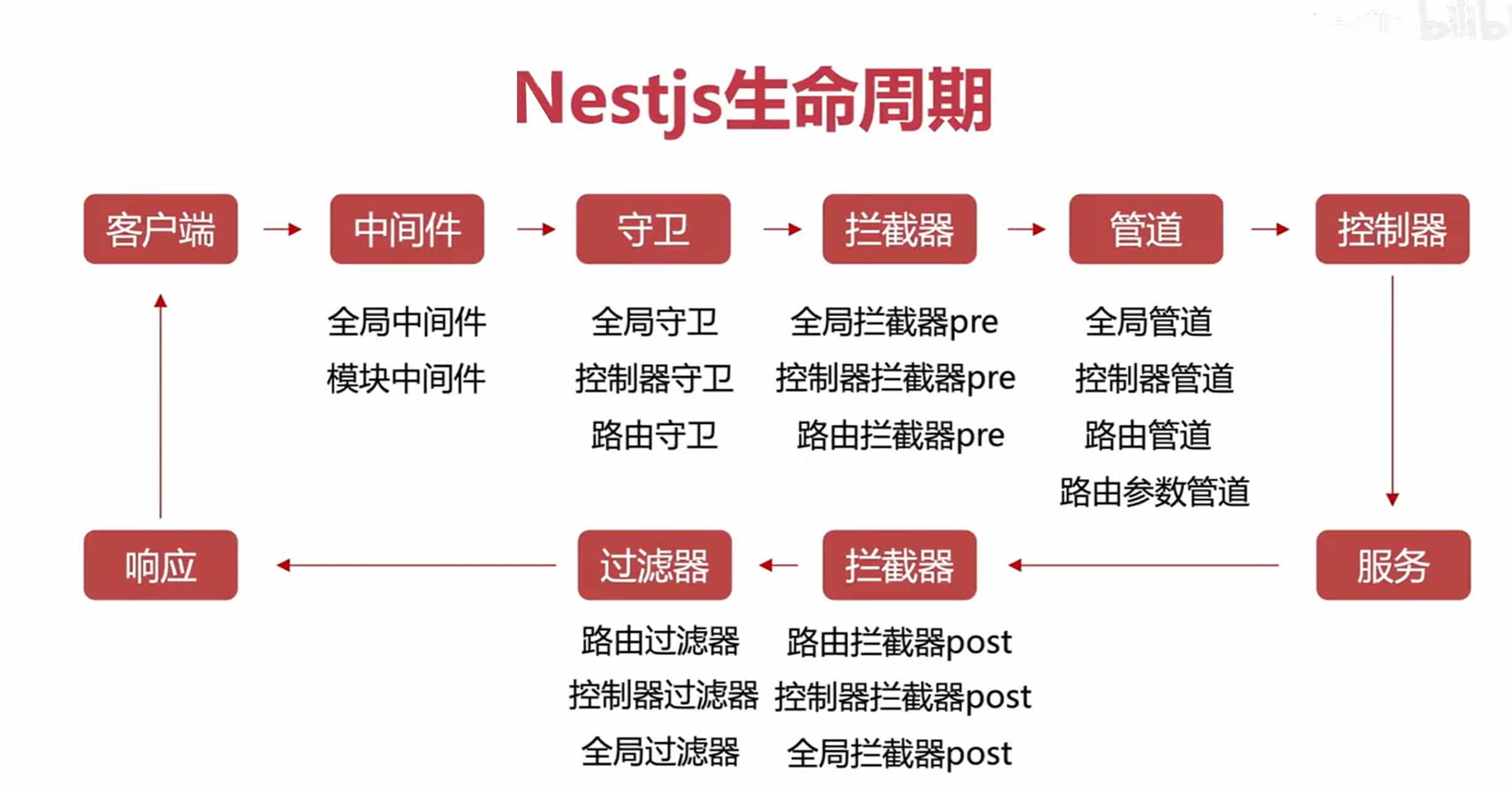
核心概念
- 控制器 Controllers:处理请求
- 服务 Services:数据访问与核心逻辑
- 模块 Modules:组合所有的逻辑代码
- 管道 Pipes:核验请求的数据
- 过滤器 Filters:处理请求时的错误
- 守卫 Guards:鉴权与认证相关
- 拦截器 Interceptors:给请求与响应加入额外的逻辑
- 存储库 Repositories:处理在数据库中数据
Guards 守卫
中文文档,守卫执行在中间件和拦截器之前,守卫支持全局守卫、控制器守卫、方法守卫
// 创建 guard 文件 admin 为控制器类的名称
nest g gu guard/admin --no-spec

import {CanActivate, ExecutionContext, Injectable} from '@nestjs/common';
import {Observable} from 'rxjs';

@Injectable()
export class AdminGuard implements CanActivate {
  canActivate(context: ExecutionContext,): boolean | Promise<boolean> | Observable<boolean> {
    // 获取请求对象
    const req = context.switchToHttp().getRequest();
    // 获取请求中的用户信息进行逻辑上的判断 -> 角色判断
    return true;
  }
}
守卫支持排除方式的自定义守卫,比如在控制器上定义了整个控制器处理请求 token 的的守卫,但是在控制器下某个接口不需要到可以使用自定义的守卫进行排除直接返回 true
常用知识要点
Swagger
// 按装插件
npm install --save @nestjs/swagger
// main.ts
import {NestFactory} from '@nestjs/core';
import {SwaggerModule, DocumentBuilder} from '@nestjs/swagger';
import {AppModule} from './app.module';

async function bootstrap() {const app = await NestFactory.create(AppModule);

 const config = new DocumentBuilder()
   .setTitle('Cats example')
   .setDescription('The cats API description')
   .setVersion('1.0')
   .addTag('cats')
   .build();
 const documentFactory = () => SwaggerModule.createDocument(app, config);
 // 文档地址 http://localhost:3000/swagger
 // swagger 是设置的路由地址,若是项目设置前缀和 swagger 无关,不影响路劲
 SwaggerModule.setup('swagger', app, documentFactory);

 await app.listen(process.env.PORT ?? 3000);
}
bootstrap();
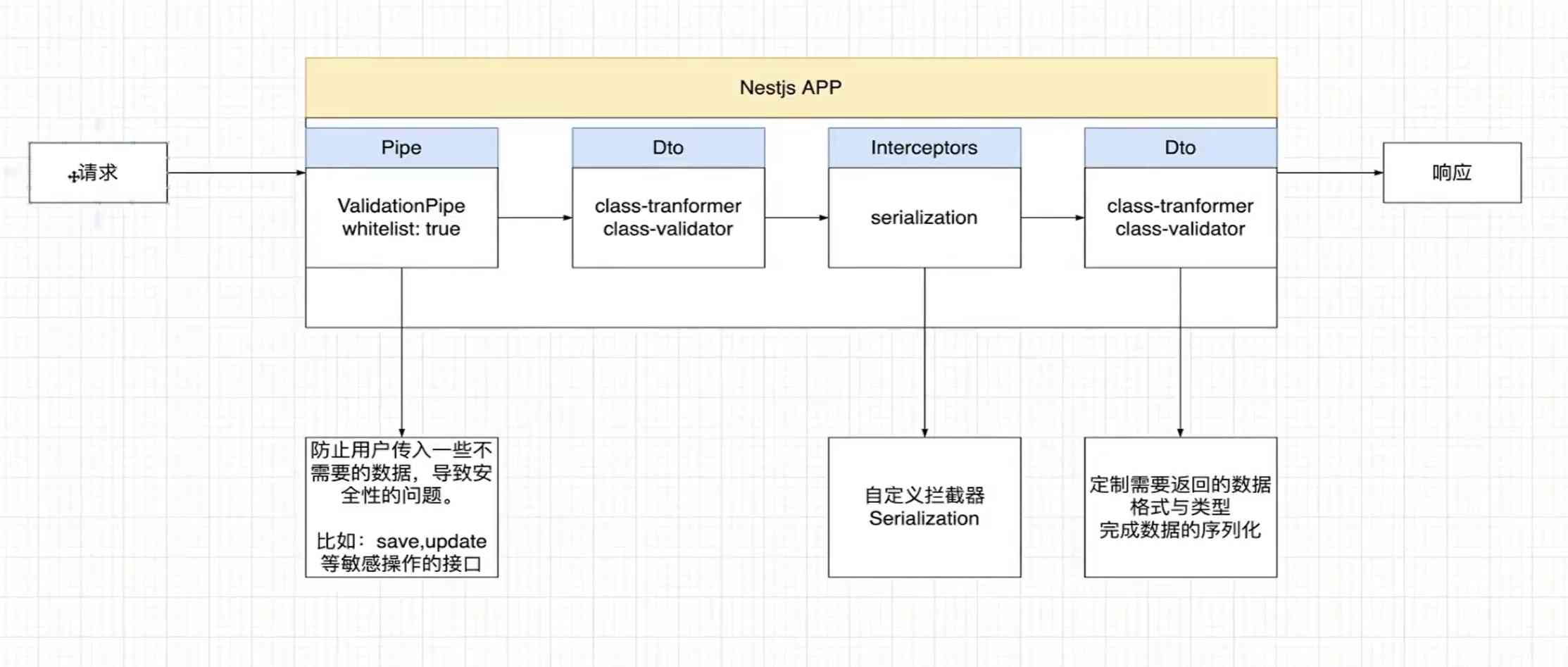
数据序列化
ClassSerializerInterceptor 拦截器利用强大的 class-transformer 包,提供了一种声明式且可扩展的对象转换方式。其基本操作是获取方法处理程序返回的值,并应用 class-transformer 中的 instanceToPlain() 函数。
任务定时器
中文文档 -任务调度
消息队列
中文文档 -队列
支持像 RocketMQ、RabbitMQ 的异步消息队列处理,让 nestjs 像其他后端一样支持微服务 | 分布式的架构支持
事件
通过在 App.module 注册事件,在控制器类 A 声明事件派发,然后在需要处理的控制器 B 上使用 @OnEvent(‘order.created’)装饰器进行监听事件,进行事件响应处理
邮件发送
yarn add @nestjs-modules/mailer nodemailer
yarn add -D @types/nodemailer
使用方式请参考 官方文档
知识重点
装饰器的执行顺序
在一个控制器方法上有多个装饰器,装饰器的执行顺序是从下往上执行
使用 UseGuards 装饰器参数传递多个守卫,则从前往后执行,如果前面的 Guard 没有通过,则
后面的 Guard 不会执行
常见问题
@Module装饰器的作用是什么?
定义一个模块并配置其元数据,使 NestJS 能够了解如何组织和运行应用程序的各个部分
- 参数支持:imports、controllers、providers、exports
- imports:
导入其他模块,包含其他控制类的模块,配置、redis 等数据库配置 - providers:知道哪些类需要被实例化,如何解决类之间的依赖关系
- controllers:AppModule 通常是应用程序的入口点
- exports: 将模块导出供其他地方使用,或者说是其他 service、controller 使用
- 构建出结构清晰、易于维护和扩展的应用程序
缺少注入报错
[Nest]37370-2023/11/03 17:41:06ERROR [ExceptionHandlerl Nest can't resolve depenof the UserService (?), Please make sure that the argument UserRepository at indenciesdex [0]is available in the UserModule context.

Potential solutions:
-If UserRepository is a provider, is it part of the current UserModule?
If UserRepository is exported from a separate @Module, is that module imported within
UserModule?
上面报错的意思是调用的方法不知道从哪里来是从 module 模块的 provider 提供还是类的本身提供方法,如果是从外部导入,请在 @Module 的装饰器上 imports 导入
 ERROR [ExceptionHandler] InvalidClassModuleException [Error]: Classes annotated with @Injectable(), @Catch(), and @Controller() decorators must not appear in the "imports" array of a module.
Please remove "JwtService" (including forwarded occurrences, if any) from all of the "imports" arrays.
这个意思是在控制器下引用的 JwtService 在 module 模块只能是 providers 数组内的方式导出,不能使用 imports 方式导入
Swagger 报:Failed to fetch Possible Reasons:Cors Network Failure URL scheme must be http or https for Cors request
因为在控制器上使用了 @Res() 装饰器,但是返回的数据未通过 res.json()发送响应,导致请求挂起。